In this lesson, You will learn how to get a list as an input in Python. Using the input() function, you can take a list as input from a user in Python.
Using the Python input() function, we can directly accept strings, numbers, and characters from the user. However, to take a list as input from a user, we need to perform some parsing on user input to convert it into a list. We will see this in the below steps and examples.
Table of contents
How to Get a list of numbers as input from a user in Python
Below are the simple steps to input a list of numbers in Python.
- Use an input() function
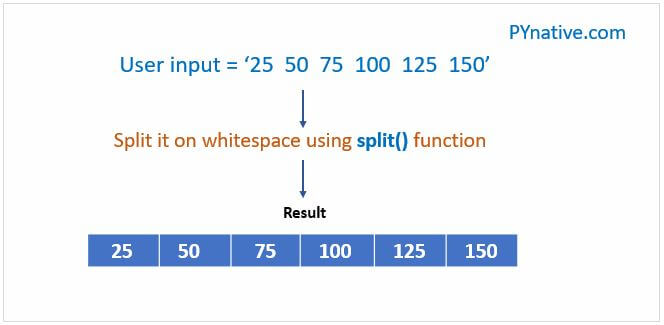
Use an input() function to accept the list elements from a user in the format of a string separated by space.
- Use the split() function of the string class
Next, the
split()method breaks an input string into a list. In Python, thesplit()method divides a string into multiple substrings based on a specified delimiter. If no delimiter is provided, it defaults to splitting on whitespace. - Use for loop and range() function to iterate a user list
Now, access list elements using a for loop and range() function.
- Convert each element of the list into a number
At the end, convert each element of a list to an integer using an int() function. If you want a list of strings as input, skip this step.
Example: Get a list of numbers as input from a user and calculate the sum of it
Output:
Enter elements of a list separated by space
string list:  ['5', '10', '15', '20', '25', '30']
User list:  [5, 10, 15, 20, 25, 30]
Sum =  105
Note:
The Python input() function always converts the user input into a string and then returns it to the calling program. With those in mind, we converted each element into a number using an int() function.
If you want to accept a list with float numbers, you can use the float() function.
Also, Solve:
Input a list using input() and range() function in Python
Let’s see how to accept a list as input without using the split() method.
- First, create an empty list.
- Next, accept a list size from the user (i.e., the number of elements in a list)
- Next, run the loop till the size of a list using a for loop and range() function
- Now, use the
input()function to receive a number from a user. - At the end, add the current number to the list using the
append()function
Example:
Output:
Enter the list size 5

Enter number at index 0
5
Enter number at index 1
10
Enter number at index 2
15
Enter number at index 3
20
Enter number at index 4
25

User list is  [5, 10, 15, 20, 25]
Input a list using a list comprehension in Python
List comprehension is a concise way to create lists in Python. It’s a syntactic construct that offers a more readable and often shorter alternative to creating lists using loops.
It is generally a list of iterables generated to include only the items that satisfy a condition.
Let’ see how to use the list Comprehension to get the list as an input from the user.
- First, decide the size of the list.
- Get numbers from the user using the
input()function. - Split the string on whitespace and convert each number to an integer using a
int()function. - Append all those numbers to the list.
Example:
Output:
Enter the size of the list 5
Enter the list items separated by space 2 4 6 8 10

User list:  [2, 4, 6, 8, 10]
Input a list using the map function
Python’s map() function is a built-in function that applies a given function to all the items in the input list (or any iterable).
Let’s see how to use the map() function to get a list as input from the user.
- First, decide the list size.
- Next, accept numbers from the user separated by space
- Next, use the
map()function to wrap each user-entered number in it and convert it into an integer or float as per your need
Example:
Output:
Enter the size of list : 5
Enter the list numbers separated by space 2.5 5.5 7.5 10.5 12.5

User List:  [2.5, 5.5, 7.5, 10.5, 12.5]
Get a list of strings as input from a user
Accepting a list of strings from the user is very straightforward.
- Accept the list of strings from a user in the format of a string separated by space.
- Use the
split()function on the input string to break a string into a list of words.
Example:
Output:
Enter all family members name separated by space  Jessa Emma Scott Kelly Tom

Printing all family member names
Jessa
Emma
Scott
Kelly
Tom
Accept a nested list as input
In this example, Let’s see how to get evenly sized lists from the user. Let’s see how to accept the following list from a user.
Nested List: [[10, 20, 30], [40, 50, 60], [70, 80, 90]]
Example:
Output:
Enter the number of sub list 3
Enter single number and press enter: 10
Enter single number and press enter: 20
Enter single number and press enter: 30
Enter single number and press enter: 40
Enter single number and press enter: 50
Enter single number and press enter: 60
Enter single number and press enter: 70
Enter single number and press enter: 80
Enter single number and press enter: 90

List is [[10, 20, 30], [40, 50, 60], [70, 80, 90]]
Next Steps
Let me know your comments and feedback in the section below.
Also, Solve:

I have a request: there are some codes that are just given there. If you can explain the working flow or give a flow chart of them, it will be very useful to those who are new to Python.
# accept nested list from user
list_size = int(input(“Enter the number of sub list “))
print(“\n”)
final_list = [[int(input(“Enter single number and press enter: “)) for _ in range(list_size)] for _ in range(list_size)]
print(“List is”, final_list)
I could not understand this last program working, can somebody help me with this.
I am new in python,I want to make program which accepts as many number from user and add them all when I type ‘s’ I tried but it’s not working please help me…..
def add_1():active = True
num_1 = []
while active:
number = input("Enter the number: ")
number = int(number)
num_1.append(number)
continue
if number == 's':
number = chr(number)
for nums in num_1:
x = sum(num_1[0:])
print(x)
add_1()I am trying for my code to do this.
Write code that prompts for and reads a list of integers, It splits the list in half Outputs the half with the larger sum. If the list is of odd length, it includes 1 more number in the 2nd half than in the 1st half
The following are example runs
Enter a list of numbers: [1, 3, 5, 6, 4, 2]
The larger half is [6, 4, 2]
Enter a list of numbers: [6, 5, 3, 4, 1, 2]
The larger half is [6, 5, 3]
How do i request for a user to input 5 integers on a single line?
And then check to see which numbers of that list are divisible by a two?
Please and thanks
def func():X = list(int(lip) for lip in input("Enter five integers: ").strip().split())[:5]
print(X)
for i in range(len(X)):
if i % 2 == 0:
print("It is divisible by 2")
else:
print("Not divisible by two")
def func():X = list(int(lip) for lip in input("Enter five integers: ").strip().split())[:5]
print(X)
for i in range(len(X)):
if i % 2 == 0:
print("It is divisible by 2")
else:
print("Not divisible by two")
Thanks man this is exactly what i was looking for just two lines of code actually help me from every time switching to MS excel to convert my data into list and hard coding it
i k bad se comma hatao baccho ko galt pdha rha h case kr dunga
really this is wrong
I need help in ;
– taking different inputs from the user and storing them in lists
so there should be a list for each of the following;;
item
cost
priority
state
– then I should compare the budget of the user with each price of the items and print a list of the priorities
Devise an algorithm that takes your monthly budget, the amount of money you wish to save, and a list of the prices of all the items you might need to buy during the month with a priority value (for example, from 1 to 10, with 10 being the highest priority item) to describe how much you need that item. The algorithm then should give you a plan of what to buy and what not to buy based on your priority.
this module helped me a ton, Keep it up Vishal
thanks for help
The function
greater_than_seven(list_int)receives a list of integers as input.The result of the function should be a new list containing only numbers greater than 7 modulo.
Example: [-10, -90, 50, 4, 3]
Output: [-10, -90, 50]
i have my list and i am try to let my user pick from the list how do I do that
Write a python code which can sort out a list or tuple in descending order.
how to a list of numbers from the user without knowing the length of the list and to know the second largest number from that list/
write python code to add n integer elements in the list.validate input .
list=[10,30,40,20,60,90]
max=list[0]
for item in list:
if item>max:
max=item
print(“max 1= “,max)
list.remove(max)
print(list)
max2=list[0]
for i in list:
if i>max2:
max2=i
print(“max 2= “,max2)
Hi Vishal,
I am trying to print a list by getting input from user using the map function.
When I replace ‘[]’ with ‘()’ i see a difference in the flow of the program.
I want to know why is my print command to print”here” is getting executed differently in both the code
code 1:
———–
enter the list size3
enter the numbers1
enter the numbers5
enter the numbers6
here
hai
[1, 5, 6]
code 2
——–
enter the list size3
here
enter the numbers1
enter the numbers5
enter the numbers6
hai
[1, 5, 6]
How to rotation numbers ?
Hey Vishal,
INPUT
OUTPUT
Enter a list of elements separated by space 2 4 6 8 10 12
user list is [‘2’, ‘4’, ‘6’, ‘8’, ’10’, ’12’]
Sum = 42
———————————————————-
In this case, I wanted the elements of my list to be an integer and not string. How can I do that?
Hey Samarjyoti Ray, Please use this code
instead for sum of list just simply
then the sum will be displayed!!!!
I’m getting ouput
['l','l','a','a']i want [‘l’,’a’]
Hi, the output is getting correctly printed in the console but the same is not getting properly printed when I am writing it in a text file. For example in console all the family member names :Jhon
Kelly
Scott
Jessa
are getting printed but when I write it into a file, I see only Jessa is printed.
Could you help me on this ?
########################################## device_name = input('hostname(use , for multiple devices): ') device_name = device_name.lower() device_list = device_name.split(',') for name in device_list: output = (name.strip()) print(output) with open('device_file.txt', 'w+') as f: f.write(output)Hey Priyank,
You are writing only last entry in a file. You need to open a file in append mode so it will not overite also write file code in for loop.
Solution:
device_name = input('hostname(use , for multiple devices): ') device_name = device_name.lower() device_list = device_name.split(',') for name in device_list: output = (name.strip()) print(output) with open("device_file.txt", "a") as f: f.write(output) # To add new line after each entry f.write("\n")Thanks Vishal, it worked , I have one more question , How about If I want to reuse this existing file device_file.txt for new content .
Let say , code write this file with 1,2,3,4 . Now next time when I run this code , it will append new line to existing content , But I want to overwrite the existing content only when I rerun this code .
Please help me to achieve this .
hey Priyank Please try this
device_name = input('hostname(use , for multiple devices): ') device_name = device_name.lower() device_list = device_name.split(',') with open("device_file.txt", "w+") as f: for name in device_list: output = (name.strip()) print(output) f.write(output) # To add new line after each entry f.write("\n")hi
can you help me
how can i store values from text input into an array?
Smallest and largest numbers in a list
list1 = []
 num = int(input())
for i in range(1, num + 1):
    ele = int(input())
    list1.append(ele)

print(min(list1), max(list1))
this program. doesn’t execute for me, shows EOF error in line 5, ele= int(input()
can anyone help?
Hi Prithvi, This is working. Don’t enter any invalid value input
Hi This is Mahesh beginner in python,
Can you Please Suggest some Important Python books and books like how you explain in your website.
If possible give some good explain python videos.
Thanking you
Hi, i am using the list function to sort an input list , but when a two digit number is inputted, it will think 9 is bigger
For example:
when this list is entered: 1 2 9 66 3 2 55 2 3 66
it is sorted as: [‘1’, ‘2’, ‘2’, ‘2’, ‘3’, ‘3’, ‘5’, ’55’, ’66’, ’66’, ‘9’]
Is there something im doingg wrong?
My code is:
numbers = input("Enter a list of no.s: ") list = numbers.split( ) list.sort() print(list)Hey Anish It is treating the number as String. Pass list.sort(key=int) to specify the data type to sort the input list in Python
For example:
numbers = input("Enter a list of no.s: ") list = numbers.split( ) list.sort(key=int) print(list)Thank you so much!
Hey Vishal,
First of all, your website is really helpful! But I still have a similar problem left similar to Anish’s. I tried to do as you told, but I can’t figure it out for my case. My max should be 16, not 9. What am I’m doing wrong?
My program:
from utils import find_max
input_numbers = input(" ")
numbers = input_numbers.split(" ")
numbers.sort(key=int)
print(find_max(numbers))
What I get on the terminal:
1 2 3 4 16 9
9
What I imported (I know there is a shortcut for this but I just try to exercise):
def find_max(numbers): largest = numbers[0] for number in numbers: if largest < number: largest = number return largestWhatever you enter as input, input function convert it into a string. If you enter an integer value still input() function convert it into a string. You need to do the explicit conversion into an integer in your code.
try this
def find_max(numbers): largest = int (numbers[0]) for number in numbers: num = int (number) if largest < num: largest = num return largest input_numbers = input("Enter numbers") numbers = input_numbers.split(" ") print(numbers) numbers.sort(key=int) print(find_max(numbers))Thank you very much!!
Hi the ouput is getting correctly printed in the console but the same is not getting properly printed when i am writing it in a text file. For example in console all the family member names :Jhon
Kelly
Scott
Jessa
are getting printed but when i write it into a file , i see only jessa is printed.
Could you help me on this ?
Hey Anirban, Can you please show me your code
Hey Vishal,
I am also facing a similar problem with my code.
device_name = input('hostname(use , for multiple devices): ') device_name = device_name.lower() device_list = device_name.split(',') for name in device_list: output = (name.strip()) print(output) with open('device_file.txt', 'w+') as f: f.write(output)Hey Priyank,
You are writing only last entry in a file. You need to open a file in append mode so it will not overite also write file code in for loop.
Solution:
device_name = input('hostname(use , for multiple devices): ') device_name = device_name.lower() device_list = device_name.split(',') for name in device_list: output = (name.strip()) print(output) with open("device_file.txt", "a") as f: f.write(output) # To add new line after each entry f.write("\n")Write a python code which can get a number and print a list of having all digits in that number like. (if num =1908, will output [1,9,0,8])
Very helpful, the explanation is crisp and good.
I am glad you liked it
Hi Vishal,
your exercises are very helpful.
I got motivate to learn python from you only..
Please let me how can i attend your session or exercises and videos..
Please share me your availability on my personal mail id..
Hey Shiva, Thank you for your appreciation.
Vishal,
In example “Python input list of strings”, you separated the elements by comma while some elements were left with blank space in front, how could I accomplish the same separation without leaving with this blank space in front?
I try
input_string.split(", ")but doesn’t work for input example:
Hi Maxwell use strip() method while printing a string
For example:
Write a python program to validate the phone number ?
1). Get the input from oser.
2). Using regular expressions
3).without using regular expressions.
Give input as “Max, well, sampaio” i.e., insert spaces after each comma
Hii
Can you please help me with these programs?
Apply insertion sort to the list below. Show the modified list and the index
position of the minimum index after each iteration of the algorithm:
4
3 Consider dictionary Dict1 that represents vehicle models and their number
available in a company.
For example, Dict1 is defined as follows:
Dict1 = {‘BMW’ :5, ‘Mercedes’: 10, ‘Volkswagen’: 10,‘Jaguar’: 4, ‘Landrover’:15}
Write a Python function Model() that accepts Dict1 along with a vehicle
model. It returns the number of vehicles available for that model. If the model
does not exist in Dict1, then it should return a value of -1.
5
4 Write a Python program that accepts a list Number_List as input. Ensure that
the user enters numeric values as input in the list. Take an input Num from the user to be searched in Number_List.