This article demonstrates how to select rows of a MySQL table in Python.
You’ll learn the following MySQL SELECT operations from Python using a ‘MySQL Connector Python’ module.
- Execute the SELECT query and process the result set returned by the query in Python.
- Use Python variables in a where clause of a SELECT query to pass dynamic values.
- Use
fetchall(),fetchmany(), andfetchone()methods of a cursor class to fetch all or limited rows from a table.
Further Reading:
Table of contents
Prerequisites
Before moving further, Please make sure you have the following in place: –
- Username and password to connect MySQL
- MySQL table name from which you want to select data.
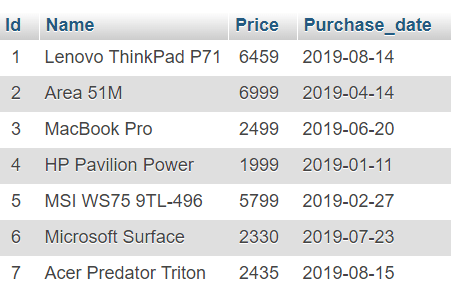
For this lesson, I am using a ‘Laptop’ table present in my MySQL server.
If a table is not present in your MySQL server, you can refer to our article to create a MySQL table from Python.
You can also download a SQL query file, which contains SQL queries for table creation and data so that you can use this table for your INSERT operations.
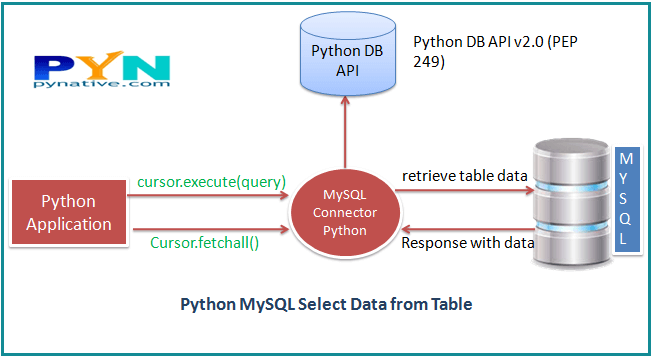
Steps to fetch rows from a MySQL database table
Follow these steps: –
How to Select from a MySQL table using Python
- Connect to MySQL from Python
Refer to Python MySQL database connection to connect to MySQL database from Python using MySQL Connector module
- Define a SQL SELECT Query
Next, prepare a SQL SELECT query to fetch rows from a table. You can select all or limited rows based on your requirement. If the where condition is used, then it decides the number of rows to fetch.
For example,SELECT col1, col2,…colnN FROM MySQL_table WHERE id = 10;. This will return row number 10. - Get Cursor Object from Connection
Next, use a
connection.cursor()method to create a cursor object. This method creates a newMySQLCursorobject. - Execute the SELECT query using execute() method
Execute the select query using the
cursor.execute()method. - Extract all rows from a result
After successfully executing a Select operation, Use the
fetchall()method of a cursor object to get all rows from a query result. it returns a list of rows. - Iterate each row
Iterate a row list using a for loop and access each row individually (Access each row’s column data using a column name or index number.)
- Close the cursor object and database connection object
use
cursor.clsoe()andconnection.clsoe()method to close open connections after your work completes.
Example
In this example, we are fetching all the rows from the Laptop table and copying them into Python variables so we can use it in our program.
Output: –
Total number of rows in Laptop is:  7
Printing each laptop record

Id =  1
Name =  Lenovo ThinkPad P71
Price  =  6459.0
Purchase date  =  2019-08-14

Id =  2
Name =  Area 51M
Price  =  6999.0
Purchase date  =  2019-04-14

Id =  3
Name =  MacBook Pro
Price  =  2499.0
Purchase date  =  2019-06-20

Id =  4
Name =  HP Pavilion Power
Price  =  1999.0
Purchase date  =  2019-01-11

Id =  5
Name =  MSI WS75 9TL-496
Price  =  5799.0
Purchase date  =  2019-02-27

Id =  6
Name =  Microsoft Surface
Price  =  2330.0
Purchase date  =  2019-07-23

Id =  7
Name =  Acer Predator Triton
Price  =  2435.0
Purchase date  =  2019-08-15

MySQL connection is closed
Note: Use the following methods to fetch data returned by a cursor.execute()
cursor.fetchall()to fetch all rowscursor.fetchone()to fetch a single rowcursor.fetchmany(SIZE)to fetch limited rows
Use Python variables as parameters in MySQL Select Query
We often need to pass variables to SQL select query in where clause to check some conditions. Let’s say the application wants to fetch laptop price by giving any laptop id at runtime. To handle such a requirement, we need to use a parameterized query.
A parameterized query is a query in which placeholders (%s) are used for parameters and the parameter values supplied at execution time.
cursor.execute("SELECT Price FROM Laptop WHERE id = "ID from application")Code language: Python (python)Example
Output:
Id =  1
Name =  Lenovo ThinkPad P71
Join Date =  6459.0
Salary  =  2019-08-14

connection is closed
Id =  2
Name =  Area 51M
Join Date =  6999.0
Salary  =  2019-04-14

MySQL connection is closed
Select limited rows from MySQL table using fetchmany and fetchone
In some situations, fetching all the rows from a table is a time-consuming task if a table contains thousands of rows.
If we fetch all rows, we need more space and processing time. So it is essentials to use the fetchmany() method of cursor class to fetch fewer rows.
Syntax of the cursor’s fetchmany()
rows = cursor.fetchmany(size=row_size)Code language: Python (python)Cursor’s fetchmany() methods return the number of rows specified by size argument, defaults value of size argument is one. For example, if the specified size is 5, then it returns five rows.
Note: If a table contains a row lesser than the specified size, then fewer rows are returned.
Syntax of fetchone()
row = cursor.fetchone()Code language: Python (python)This method fetches the next set of rows of a query result and returns a list of tuples. If no more rows are available, it returns an empty list.
This method returns a single record or None if no more rows are available.
The fetchone() method is internally used by a fetchall() and fetchmany() to fetch rows.
Example to fetch fewer rows from MySQL table using cursor’s fetchmany
Output:
Total number of rows is:  2
Printing  2  Laptop record using cursor.fetchmany
(1, 'Lenovo ThinkPad P71', 6459.0, datetime.date(2019, 8, 14))
(2, 'Area 51M', 6999.0, datetime.date(2019, 4, 14))
Note: If you are getting MySQL Unread result error set buffered=True in connection like connection.cursor(buffered=True).
Fetch single row from MySQL table using cursor’s fetchone
Output: –
Printing first record (1, 'Lenovo ThinkPad P71', 6459.0, datetime.date(2019, 8, 14))
MySQL connection is closed
Python Fetch MySQL row using the column names
You can also retrieve result using columns names instead of id. For example, you would like to do something like this.
records = cursor.fetchall()

for row in records:
    val1 = row["columnName1"], )
    val2 = row["columnName2"])
    val3 = row["columnName3"])Code language: Python (python)
If you try to fetch data using column name directly, you will receive a TypeError: tuple indices must be integers or slices, not str.
To select records from my MySQL table using a column name, we only need to change the cursor creation. Replace the standard cursor creation with the following code, and you are ready to fetch records from my MySQL table using a column name.
cursor = connection.cursor(dictionary=True)Code language: Python (python)Why set dictionary=True? because MySQLCursorDict creates a cursor that returns rows as dictionaries so we can access using column name (here column name is the key of the dictionary)
In the following example, I have selected all the records from my MySQL table using a column name instead of the column’s integer index.
Output:
Fetching each row using column name
1 Lenovo ThinkPad P71 6459.0 2019-08-14
2 Area 51M 6999.0 2019-04-14
3 MacBook Pro 2499.0 2019-06-20
4 HP Pavilion Power 1999.0 2019-01-11
5 MSI WS75 9TL-496 5799.0 2019-02-27
6 Microsoft Surface 2330.0 2019-07-23
7 Acer Predator Triton 2435.0 2019-08-17
10 Lenovo ThinkPad P71 6459.0 2019-08-14
11 Lenovo ThinkPad P71 6459.0 2019-08-14
MySQL connection is closed
Select MySQL column value into a Python Variable
Let’s see how to execute the following SELECT SQL Query and store the table’s column value into a Python variable for further processing.
Ig you execute the below code you will get {u’Price’: u’7000′}.
cursor.execute("SELECT Price FROM Laptop WHERE id = 21")
print (cursor.fetchone() )Code language: Python (python)
You can get the output like
{u'Price': u'7000'}
Let’s see how to extract just the column value (7000) and save it in a variable to do some calculations so you can give a 10% discount on it.
Output:
Laptop price is :  6459.0
MySQL connection is closed
Let’s understand this example:
- You can see in the above example after fetching a row using a
cursor.fetchone()we converted column value to appropriate type usingvalue = float(record[0]). - We retrieved the 0th index value from the result set.
Next Steps:
To practice what you learned in this article, Please solve a Python Database Exercise project to Practice and master the Python Database operations.

Hi Sir,
Can I know what the code would be if I want fees from the table hostel_management for the certain departments when the user tells which department they would like to know about?
elif choice==2:print("Available departments as follows")
print("1.Computer")
print("2.Bio")
print("3.Tech")
print("4.Physics")
print("5.Eco")
print("6.Eng")
dep=input("Enter your department")
mysql=("select fees from hostel_management where dep='dep from hostel_management'")
cl.execute(mysql)
data=cl.fetchall()
data=["Fees"]
print("Your fees is:",data)
Thanks, Sir
hi vishal i want to connect two different host in mysql to fetch data using python flask framework pls.help me how to do it by using pymysql or mysqldb or else
hello, submit this side,
I wrote a code in python to check the values in the MySQL database if exists then return data exists,
and if not then enter the data, but the code is just entering the data again and again.
please help me sort it out.
I’ll be thankful to you.
here’s my code,
please help me to sort it out.
Thank you so much Vishal this tutorial has changed my day. It realy helpful.
Hallo everyone, I have a sqlite table with data for customers, I need to make a Function that if I write a Telefon number or an ID It will give me the rest of the data for this customer like his name and address from the list. I will be very thankful for the help
I was having a problem getting Select * from database where command to work. Python connector kept telling me there was an error, when I saw you had written line like this:
cursor.execute(sql_select_query, (id,)) The parenthesis around the variable made it start working (still don’t get the second comma, but I digress). Still have one problem and was wondering if you had ever seen this…. I’m using fetchone with the while loop, I get the right db entry, but I get the right answer 43 times, and that is the number of entries in my db. Right now there is only 43 lines for testing, but soon will around 2,000 so this isn’t a solution. When I run the query inside mysql, I get one answer, and I know it’s one answer, because I’m searching the primary key. The number I’m searching for is in only one record in the db. I thought I saw a command to kill a fetchone after it is started, but can’t seem to find it. Is there a way to clear out the rest of the fetches, or an idea of what I did wrong?
Hi,
I want the price to be displayed as it is in the source data not with the decimal. Is there anyway to fetch the exact data without decimal
Hi Gayatri
one of the ways that you fetch exact same data and then change the datatype
example:
then the output will be 12 only
Correctly:
Hi, Vishal,
Thanks for your post.
But when I try the below query getting an invalid character error
Any suggestion on this will be appreciated, Thanks.
Hey Ramkumar, please remove the semicolon from the query string. Change Select_query = “select * from table_name;” to Select_query = “select * from table_name”
hii vishal
when i run the query end with semicolon then it will give output too
according to me we will use ”’ ”’ instead of ” ”
thank you
Perdón por la molestia, pero éste codigo no me funciona, me puedes decir por que? Gracias !!!
Thanks for the simple example and explanation!
Thanks, Vishal, this is a great example.
When using a dictionary cursor instead of querying * all columns, how can I query multiple fields using a list?
I’ve been trying f-string to create query like this:
f"SELECT {p} FROM death WHERE sex = '{s}' AND ghe = '{g}' AND age = '{ag}'"But if p is a list or tuple it doesn’t work
Hey Andrew, We cannot set column names as PreparedStatement values. You can only set column values as PreparedStatement values. You need to convert the list to string before passing it into a select query. For example.
p = ['Name', 'Price '] columnsToSelect = " , ".join(p) mySql_select_Query = "select" +" "+columnsToSelect+ "from laptop"Vishal,
Thank you for answering so many questions! I have another one that perhaps you can help with.
After I have selected some records from my MySQL database I would like to use the filed names to get values instead of the integer index of the field.
For example in my python code I have:
Is there a way to do this?
Hi Garth, To selected records from my MySQL table using a column name, we only need to change the cursor creation. Replace the standard cursor creation with the following code, and you are ready to fetch records from my MySQL table using a column name.
cursor = connection.cursor(dictionary=True)I have updated this article with the solution to your problem. Please check
Hi, is there a way to constantly get output when new row is written into table. Let’s say we got the output of the laptop table, but if I update table with new laptop, the new laptop pop ups in the output without closing the connection and application and relaunching it. Thanks
Thank you for your help.
Sir, I have tried this SQL configuration which worked, but I couldn’t make it up with the functions to have access to the database, but it worked on its own as shown below.
import pyodbc
conn = pyodbc.connect('Driver={SQL Server};'
                      'Server=BTBELLO-PC\SQLEXPRESS;'
                      'Database=Church;'
                      'Trusted_Connection=yes;')

cursor = conn.cursor()
cursor.execute('SELECT * FROM Master')

for row in cursor:
    print(row)
So, I would like to have this above connection to replace the MySQL in the previous posting to have a connection to the SQL database through it.
Thank you
Hi Babatunde. Make the database connection function separately for each database server which returns a connection object. access specific database connection function whenever you want to.
For example:
import sqlite3 import mysql.connector def getSqliteConection(databaseName): return sqlite3.connect(databaseName) def getMySQLConection(databaseName): return mysql.connector.connect(host='localhost', database='databaseName', user='pynative', password='pynative@#29') #Now call respective connection whenever required an perform your operation. sqliteConn = getSqliteConection(SQLite_Python.db) # do your sqlite operation here # for example # sqliteCursor = sqliteConn.cursor() mySQLConn = getMySQLConection(SQLite_Python) # do your MySQL operation here # for example # mySQLCursor = mySQLConn.cursor()sql_Query = "select price from laptop where id =%s" id = (1,)I want to input id after the execution of the query, it will ask me ‘enter id number’ once I enter id number it will display result
Hi Juzar para,
You need to accept input from user and then pass that input to the query like this.
id = int ( input ("Enter laptop Id") ) sql_select_query = """select * from laptop where id = %s""" cursor.execute(sql_select_query, (id,))Sorry i cannot edit my comment but my problem is this Vishal:
and the error says:
AttributeError: ‘MySQLConverter’ object has no attribute ‘_tuple_to_mysql’
.
.
.
mysql.connector.errors.ProgrammingError: Failed processing format-parameters; Python ‘tuple’ cannot be converted to a MySQL type
How I convert a tuple to mysql, is the connector the problem I think
Good afternoon, I have a problem relating to retrieving the ID (primary key) of an inserted record. my primary key has a prefix and may be causing this retrieval using lastrowid, _last_insert_id() and/or @@identity to work properly. any suggestions?
Richard Nwaiwu, can you please provide sample of your code
Hello,
I have a related question to db, how can I display the selected data in QtableWidget in pyqt5 ( it has the same column number as the db table ,of course) thank you .
Sir if I have to comepare the entry box value to the database value then what i have to do?
I am not able to install mysql. Can you provide the complete details how to install the Mysql that you used in above example. Using pip I was able to install mysql connector but say like how can I create my DB from terminal. When I enter the below command in terminal , it gives me an error:
Create database python_test
Hi Vatsala, You need to check and verify your MySQL Server installation. refer to this guide https://dev.mysql.com/doc/refman/5.5/en/windows-installation.html
Hi, I need your help,
This is Murugan. I am new in Database. I bought one windows server on GoDaddy.com. I create database name and table, column etc my aim is to access my own DB. i.e I have one raspberry pi 3 interfaces with sensors (like Temperature sensor ) that temperature sensor value wants to insert into my live DB,? I tried some code but its shows error : [Cann’t connect the website ..] so pls help me.
Please let me know the specific error code you re getting while connecting to the database
Now i got is .. thanks
ERROR is IP address
How to compare two or more db result sets in python?
Thanks in Advance!
Hi Vishal,
Is there any way to compare data between two different databases?
Eg: I have 2 different databases and data coming from multiple tables. Here I wanted to compare Source Vs Target. I have created two different connection strings and executed two sqls separately. But, how to compare the two resume sets even though we have huge volume of data.
Thanks,
Venkat
Instead of printing a table I would like to load each column into an array. No examples seem to exist. I guess it’s not possible.
The most interesting part for me is input = (2,) I can`t make my python script doing select queries right… and know what? Yes! It must be used this way to execute: not just a variable (i used UID var for WHERE) but (UID,) and now all works superbly. Thank you much!
Great. I am glad it helped you